Most small service businesses never sit down and choose a software stack. They accumulate one. You start with a booking link because a client asked for it. You add email marketing before the holidays. Someone recommends a CRM. Two years later you are paying for six subscriptions and none of them talk to each other.
Eventually the question comes up: keep the separate tools, or move everything onto one platform? Here is how the two setups actually compare.
What the separate-tool approach costs
The monthly bill is the part everyone looks at first, and it is usually higher than owners expect, because no single line item looks expensive.
Typical 2026 pricing for the individual pieces:
- CRM: roughly $15 to $40 per user per month for something that handles contacts, pipeline, and basic automation
- Email marketing: starts around $20 to $50 per month at small list sizes and climbs as your list grows
- Scheduling and booking: around $10 to $15 per user per month
- Payments and invoicing: often a monthly platform fee on top of transaction percentages
- Website, forms, review management, SMS: each one its own line item
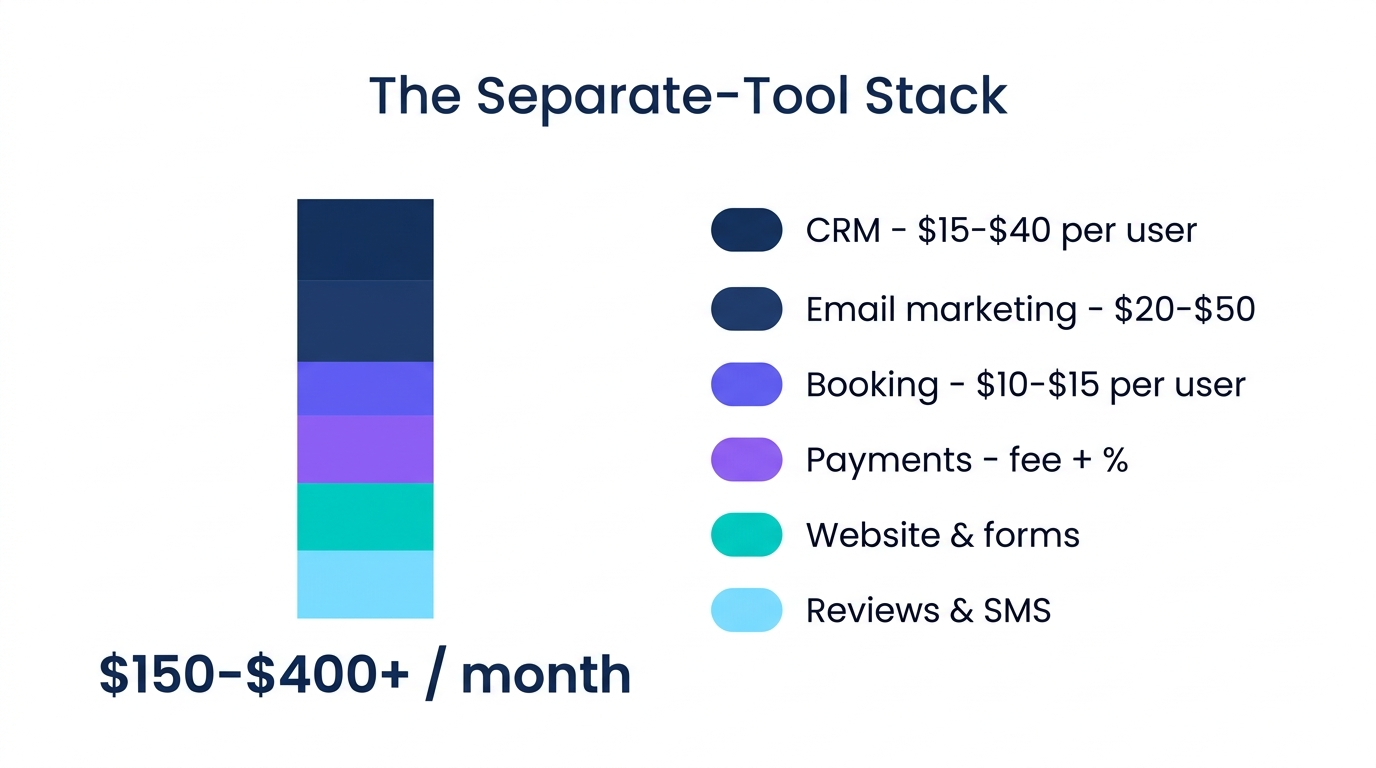
Industry pricing guides put a do-it-yourself stack for a business of two to ten people at $150 to $400+ per month. Service businesses routinely land above $300 without ever feeling like they made an expensive decision.
Per-user pricing is what makes the number move. Adding one employee to a five-tool stack can add $55 per month before that person has done a single hour of work.
The costs that never appear on an invoice
Connecting the tools to each other
Separate systems have to pass data back and forth. That usually means Zapier or a similar connector, which is another subscription, and someone has to build and maintain those connections. When a tool changes its API and a connection breaks quietly, you find out because a lead never got a follow-up.
Switching between systems all day
Answering one client question can mean opening the booking calendar, then the CRM, then the payment tool. Do that thirty times a day and a real portion of your working hours goes to navigation instead of work.
Customer records split into pieces
This is the expensive one. Booking history sits in one tool, payment history in another, email engagement in a third. Nobody can see the whole customer, so the follow-up that should be obvious never happens.
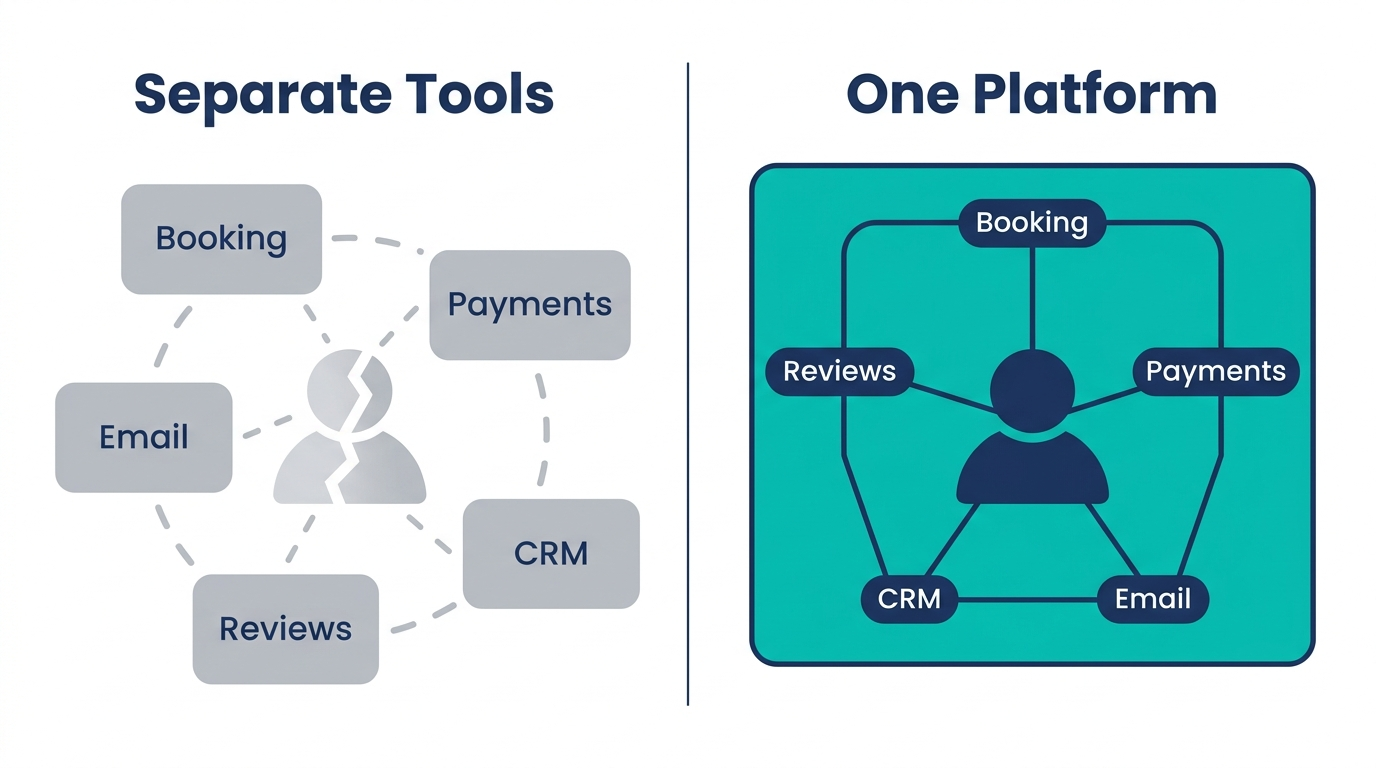
A client who booked four times last year and has not been in for six months should trigger something. In a split stack nothing triggers, because no single system knows both of those facts at once.
Where separate tools are the right call
Consolidating is not automatically correct, and it is worth being straight about that.
If one part of your operation is genuinely specialized, a dedicated tool will usually go deeper than an all-in-one module. Complex inventory, regulated recordkeeping, and high-volume ecommerce are all cases where purpose-built software earns its price.
The same applies if you have already invested heavily in configuring a system your team knows cold. Migration has a real cost in hours and disruption, and “we already know how to run it” is a legitimate reason to stay put.
The case for consolidating is strongest when your tools are mostly handling the same job from different angles: capturing a lead, talking to them, booking them, charging them, and following up afterward.
What changes on a single platform
The practical difference is not that you save on subscriptions, though most businesses do. It is that the customer record becomes one record.
When booking, payment, conversation history, and campaign activity live in the same database, automation gets straightforward. “Text everyone who has not rebooked in eight weeks” is a two-minute setup instead of a data export and a spreadsheet merge. Review requests can fire automatically after a completed appointment, because the system that ran the appointment is the system that sends the text.
Billing gets simpler too. One subscription, one renewal date, one support team to call when something breaks, rather than five vendors each pointing at the other one.
A concrete example
Take a mobile detailer running a typical split setup: a scheduling app, a separate CRM, Venmo for payments, Mailchimp for occasional promotions, and a phone that goes to voicemail while their hands are wet.
The monthly software cost might be $180. The larger cost is the four calls per day that go unanswered during jobs, at $200 to $500 per detail. On a consolidated platform, an AI voice agent answers those calls, qualifies the job, and books it into the same calendar that later triggers the payment request and the review ask. We walk through that setup in detail in our guide for mobile car detailers.
The same pattern shows up across service businesses. Lash techs and estheticians lose money to no-shows because deposits and booking live in different places. Music studios end up running scheduling, tuition billing, and parent communication across separate apps that were never designed to share information.
How to decide
Four questions worth answering before you change anything:
- Add up the real total. Every subscription, plus connector tools, plus per-user fees. Most owners are surprised by the number.
- Count your logins per customer interaction. If handling one client touches three systems, that is a workflow problem, not a preference.
- Find the follow-up you are not doing. Rebooking reminders, win-back campaigns, and review requests are the revenue that quietly leaks out of split stacks.
- Identify what is genuinely specialized. If a tool does something no general platform will match, keep it and consolidate around it.
If your answers point toward consolidation, the migration is usually less painful than expected, because most of what you are moving is contact data and calendar entries.
See what one platform looks like for your business
Nexus Omni combines CRM, booking, payments, email and SMS, an AI voice agent, website hosting, and review management in one subscription. Instead of estimating whether consolidation would work for you, run your actual workflow through it.
Start your free trial at nexusomni.app
14 days free. No credit card games. Cancel anytime.
Stop paying for the gaps
Find out what your stack is really costing you
You just added up six subscriptions. Now see the same work running on one. Tell us where your time is going and we will show you what consolidating looks like for your business.
14 days free. No credit card games. Cancel anytime.